Work in one place
eesel is a browser extension developed for the web which enables you to perform your various tasks all in one place. This utility and tools program can work with any tools—from documents and company platforms to websites and custom tools that you can open in your browser. With this productivity app, it makes the process of switching among numerous websites, documents, and online tools less time-consuming. It also doesn’t compromise your privacy, as everything in here runs locally—which means either your history or work never leaves your computer.
Top Recommended Alternative

Boost your productivity and efficiency
Working with a large number of documents online can cause a lot of stress, which may adversely affect your workflow. Thus, productivity tools like eesel are such a great aid for everyone who’s dealing with online-related works. Every tool and document that you work on and usually need will be automatically imported based on your browser history.
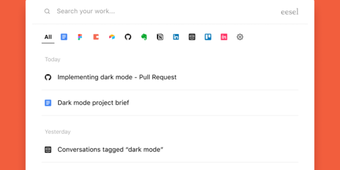
You will no longer need to pin a lot of tabs that contain your important documents and resources, as this extension is capable of sorting it out for you according to tool and date history. With this app, you are now able to declutter your workspace better. If you have tons of saved works and you’re looking for a specific file, you can easily look for it in the search bar by typing its title or content.
Eesel’s user interface is designed to be simple, straightforward, and efficient—although this can only be applicable for those who have prior experience with tools similar to this. However, for beginners in this program, it will take some time for you to adjust and fully take advantage of what it has to offer. You can access this application from any page by pressing CTRL+SHIFT+E for Windows and Command-E for Mac.
Manage your online work in the best way possible
eesel is definitely one of the productivity tools that employees, whose tasks are highly inclined towards online, should have. It greatly helps to arrange your work to positively affect your production and creativity. With this, you won’t have to open many tabs to easily access various online resources and tools that could cause confusion, as this simple browser extension like this has the capability to save and store the important pages for you.